File Handling In C++
Files are used to store data in a storage device permanently. File handling provides a mechanism to store the output of a program in a file and to perform various operations on it.
A stream is an abstraction that represents a device on which operations of input and output are performed. A stream can be represented as a source or destination of characters of indefinite length depending on its usage.
In C++ we have a set of file handling methods. These include ifstream, ofstream, and fstream. These classes are derived from fstrembase and from the corresponding iostream class. These classes, designed to manage the disk files, are declared in fstream and therefore we must include fstream and therefore we must include this file in any program that uses files.
In C++, files are mainly dealt by using three classes fstream, ifstream, ofstream.
- ofstream: This Stream class signifies the output file stream and is applied to create files for writing information to files
- ifstream: This Stream class signifies the input file stream and is applied for reading information from files
- fstream: This Stream class can be used for both read and write from/to files.
All the above three classes are derived from fstreambase and from the corresponding iostream class and they are designed specifically to manage disk files.
C++ provides us with the following operations in File Handling:-
- Creating a file: open()
- Reading data: read()
- Writing new data: write()
- Closing a file: close()

- ifstream ios::in
- ofstream ios::out
- fstream ios::in | ios::out
ofstream new_file;
new_file.open(“new_file.txt”, ios::out | ios::app );
Example of opening/creating a file using the open() function
#include<iostream>
#include <fstream>
using namespace std;
int main()
{
fstream new_file;
new_file.open("new_file",ios::out);
if(!new_file)
{
cout<<"File creation failed";
}
else
{
cout<<"New file created";
new_file.close(); // Step 4: Closing file
}
return 0;
}
Output:

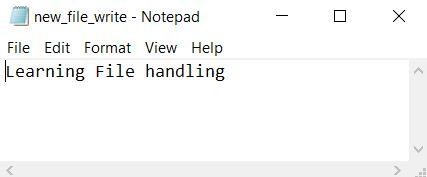
Writing to a File
While doing C++ programming, you write information to a file from your program using the stream insertion operator (<<) just as you use that operator to output information to the screen. The only difference is that you use an ofstream or fstream object instead of the cout object.
Example:-
#include <iostream>
#include <fstream>
using namespace std;
int main()
{
fstream new_file;
new_file.open("new_file_write.txt",ios::out);
if(!new_file)
{
cout<<"File creation failed";
}
else
{
cout<<"New file created";
new_file<<"Learning File handling"; //Writing to file
new_file.close();
}
return 0;
}
Output:

Reading from a File
You read information from a file into your program using the stream extraction operator (>>) just as you use that operator to input information from the keyboard. The only difference is that you use an ifstream or fstream object instead of the cin object.
Example:-
#include <iostream>
#include <fstream>
using namespace std;
int main()
{
fstream new_file;
new_file.open("new_file_write.txt",ios::in);
if(!new_file)
{cout<<"No such file"; }
else
{ char ch; while (!new_file.eof()) }
{ new_file >>ch;
cout << ch;
}
new_file.close();
return 0;
}
Output:

The file gets closed.


0 Comments